> For clean Markdown of any page, append .md to the page URL.
> For a complete documentation index, see https://docs.withpersona.com/2020-05-18/relay-widget-usage/llms.txt.
> For AI client integration (Claude Code, Cursor, etc.), connect to the MCP server at https://docs.withpersona.com/_mcp/server.
# Embedded Widget
> Embed Relay directly in a web page for the user-facing verification flow.
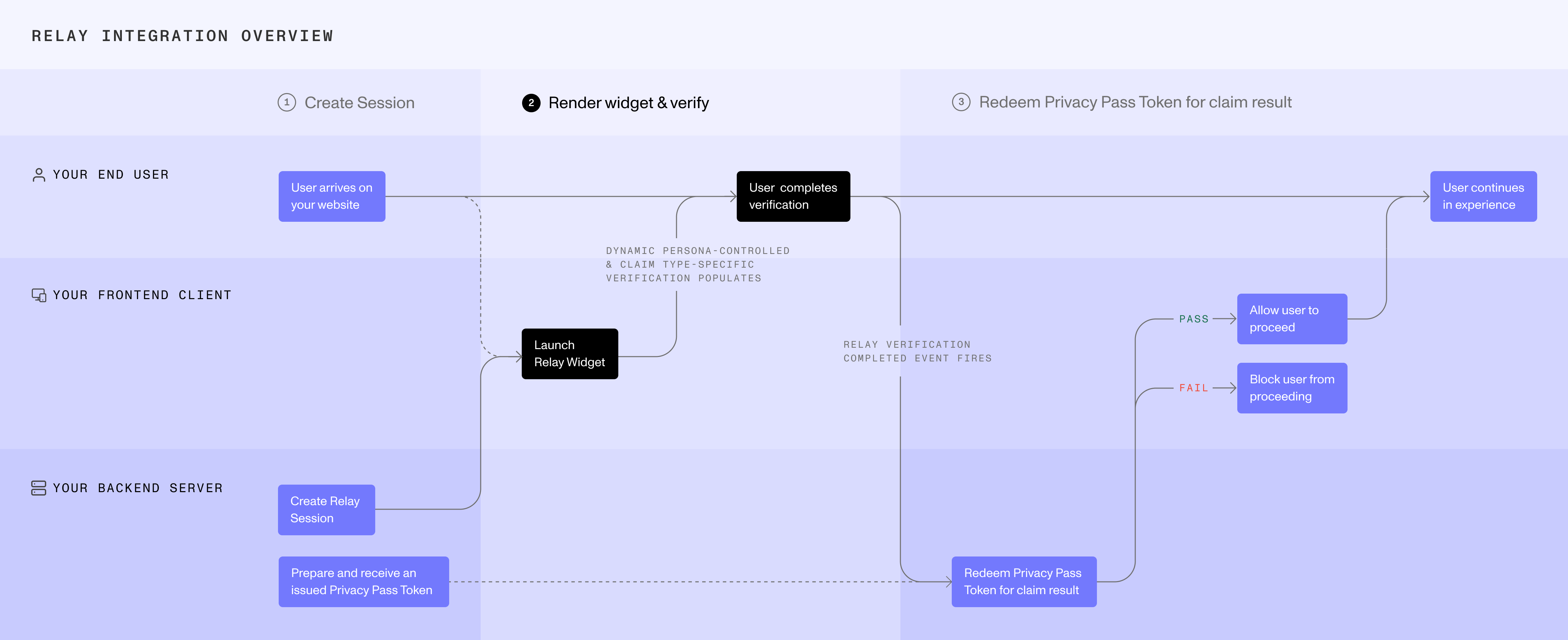
The Embedded Widget is a [client-side integration method](/relay-getting-started#client-side-integration-methods). It renders the user-facing verification directly in your website and invokes a callback when the flow finishes. No PII is returned to your client.
## Prerequisites
Before rendering the Widget, your server must create a Relay session and return the Relay session access token to your web client. See [server-side integration methods](/relay-getting-started#server-side-integration-methods).
> **Warning**
>
> Store the Relay secret securely on your server. Never expose it to the client.
## Embed the Widget
**Install**
Available on npm: [`@persona/relay`](https://www.npmjs.com/package/@persona/relay)
#### npm
```bash
npm install @persona/relay
```
#### yarn
```bash
yarn add @persona/relay
```
**Add a container element**
Add a `div` to your HTML where the Widget will render.
```html
```
The first argument accepts either a CSS selector string or a direct DOM element reference.
```javascript
// A CSS selector that targets the element with id="relay-container"
new Relay("#relay-container", options);
// A DOM element, such as a React ref
new Relay(containerRef.current, options);
```
**Initialize**
```javascript
import Relay from "@persona/relay";
const relay = new Relay("#relay-container", {
accessToken: "",
theme: "auto", // 'light' | 'dark' | 'auto' (default: 'auto')
onComplete: () => {
// Ask your server to retrieve the claim result.
},
onExpire: () => {
// The Relay session expires after 30 minutes.
// Create a new Relay session on your server, then initialize again.
},
onError: (error) => {
console.error(error);
},
});
```
During this step:
* The Widget renders the configured verification experience.
* The user completes the flow inside the Widget.
* `onComplete` signals that the user-facing flow finished. It does not return PII or the claim result.
When `onComplete` runs, ask your server to retrieve the claim result with the Relay token, Relay secret, and Privacy Pass token stored during the server-side phases. See [server-side integration methods](/relay-getting-started#server-side-integration-methods).
## Cleanup
Call `relay.destroy()` to unmount the Widget and clean up resources when it is no longer needed.
## Try the Embedded Widget
> Embed Relay directly in a web page for the user-facing verification flow.