> For clean Markdown of any page, append .md to the page URL.
> For a complete documentation index, see https://docs.withpersona.com/llms.txt.
> For AI client integration (Claude Code, Cursor, etc.), connect to the MCP server at https://docs.withpersona.com/_mcp/server.
# Tutorial: Pre-create inquiries for Embedded Flow
> Pre-create an Inquiry through the API before launching Embedded Flow.
An Embedded Flow embeds Persona's verification UI directly into your website as an iframe.
There are [two ways to use Embedded Flow](/choosing-an-integration-method#embedded-flow-web-sdk):
1. **Generate inquiries from an inquiry template** (Minimal code required)
2. **Pre-create inquiries via API** (More code required)
This guide walks you through the second method: pre-creating inquiries via API. This is the method we recommend you use in production.
You will:
* Create inquiries with prefilled user data in your backend server
* Check for existing inquiries to avoid duplicates
* Enable the user to resume partially-completed inquiries
* Pass an inquiry ID to your frontend
* Display the Embedded Flow with an inquiry ID
> **Production note**
>
> The sample code in this guide illustrates an approach that we recommend in production.
>
> However, for demonstration purposes, the code itself is simplified and not production-ready. For example, it does not include:
>
> * Authentication
> * Fetching real user information from a database
> * Error handling and retry logic
> * Monitoring
> **Alternative: Generate inquiries from template**
>
> Pre-creating inquiries (the method shown in this guide) is recommended for production use. However, if you're looking for the fastest way to test Embedded Flow, see [Tutorial: Embedded Flow with Inquiry Template](/tutorial-embedded-flow-inquiry-template).
## Prerequisites
You'll need:
* A Persona account
* A Persona [API key](/api-keys) - use the **Sandbox API key**
* Python installed locally
* This guide provides sample code in Python, but you can adapt it to any language.
Before you start, you should:
* Understand what an [inquiry](/inquiries) is
* Understand [inquiry statuses](/model-lifecycle)
* Complete [Tutorial: Embedded Flow with Inquiry Template](/tutorial-embedded-flow-inquiry-template) to understand the SDK
* Sign into the [Persona dashboard](https://help.withpersona.com/articles/3QGnmQLLnykxUkPl1wIdLT/) and switch into your [Sandbox environment](/environments)
## Scenario
A user named Alexander Sample just joined your dog walking app as a dog walker. You want to verify his identity to ensure the safety of users on your service.
Alexander's user ID in *your* app is "usr\_ABC123". During account signup in your app, he stated his birthdate is August 31, 1977.
## Step 1: Create an inquiry template
Every inquiry is created from an [inquiry template](/inquiry-templates), which defines details like the specific verification logic and UI text and branding of that inquiry. You can think of inquiry templates as a mold that lets you create many inquiries.
Persona offers a suite of [solutions](https://help.withpersona.com/solutions/all-solutions/) that include preconfigured inquiry templates. In this tutorial, use the "KYC" solution to verify your dog walkers.
**Follow [these instructions](https://help.withpersona.com/articles/67J7FurQtIgwxkWWvUropu/)** to add the "KYC" solution to your Sandbox environment.
## Step 2: Locate the inquiry template ID
Find the ID of the newly-created inquiry template.
In the Persona dashboard, navigate to **Inquiries** > **Templates**. Find the "KYC" template in the list of inquiry templates, and note the value in the `ID` field. The value should begin with `itmpl_`.
## Step 3: Create the web page
Create the web page that will display the Embedded Flow. This page shows the user onboarding flow that Alexander Sample is completing in your dog walking app.
1. Create a new directory called `embedded-flow-precreate-demo/`. Then create a subdirectory called `frontend/`.
2. Inside `frontend/`, create a file called `onboarding.html` with the following code:
**`embedded-flow-precreate-demo/frontend/onboarding.html`**
```html embedded-flow-precreate-demo/frontend/onboarding.html
Complete Your Profile - Dog Walker
Welcome, Alexander 🐕
Before you can start walking dogs, we need to verify your identity.
This helps ensure the safety of pet owners and walkers like you.
Your Information
Name: Alexander Sample
Birthdate: August 31, 1977
Debug info:
```
3. In the code, replace:
* `X.Y.Z` with the [latest SDK version](/embedded-flow-changelog)
* `env_XXXXXXXXXXXXX` with your Sandbox environment ID. Here's [how to find it](https://help.withpersona.com/articles/2phMvmqqOPVr6q50vQ9Sfh/).
4. Serve the frontend HTML file from a local python server:
```bash
cd embedded-flow-precreate-demo/frontend/
python -m http.server 8001
```
Keep this terminal window open.
5. Open `http://localhost:8001/onboarding.html` in your browser to view the page.
You should see the onboarding flow for our newly-registered dog walker:
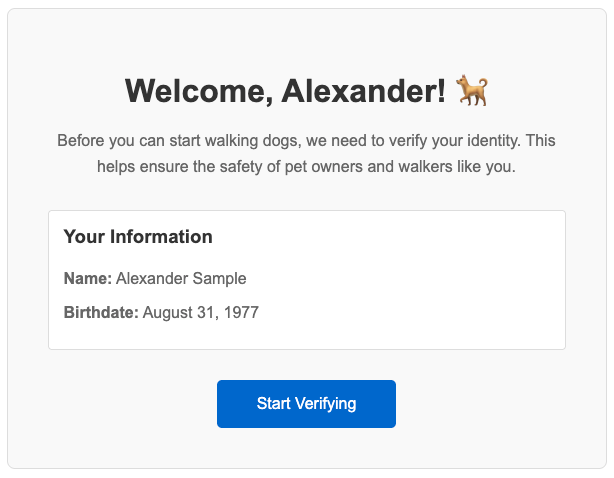
Right now, the "Start Verifying" button doesn't work. Notably, we haven't yet built the backend API that it hits.
### About the frontend code
The UI and styling here are identical to the code in the [Embedded Flow with Inquiry Template tutorial](/tutorial-embedded-flow-inquiry-template).
The key difference is in the JavaScript:
1. We fetch the inquiry ID from our backend:
```javascript
const response = await fetch('http://localhost:8000/api/inquiries/get-or-create', {
method: 'POST',
headers: {
'Content-Type': 'application/json',
}
});
const data = await response.json();
const inquiryId = data.inquiry_id;
const sessionToken = data.session_token;
```
Our backend determines if an inquiry exists or needs to be created. If an inquiry exists and it [needs to be resumed](/resuming-inquiries), the backend also returns a session token that lets the client resume that inquiry.
2. We initialize the Persona client with `inquiryId` instead of `templateId`:
```javascript
const clientConfig = {
inquiryId: inquiryId, // Pre-created inquiry from backend
environmentId: environmentId,
// No templateId needed - we use inquiry ID instead
// No fields needed - already set on the inquiry by the backend
// No referenceId needed - already set on the inquiry by the backend
...
};
const client = new Persona.Client(clientConfig);
```
This approach is more secure because users can't change the reference ID or prefilled fields.
## Step 4: Create the backend API
Now, create a backend server with one endpoint that returns an inquiry for the current logged-in user. If the user has an in-progress inquiry, the backend will return that inquiry's ID. Otherwise, the backend will create a new inquiry and return its ID.
1. Create the `embedded-flow-precreate-demo/backend/` subdirectory.
2. Create the file `backend/server.py` with the following code:
**`embedded-flow-precreate-demo/backend/server.py`**
```python embedded-flow-precreate-demo/backend/server.py
from flask import Flask, request, jsonify
from flask_cors import CORS
import requests
import os
app = Flask(__name__)
CORS(app)
PERSONA_API_KEY = os.environ.get('PERSONA_API_KEY') # Configure your Sandbox API key
PERSONA_API_URL = 'https://api.withpersona.com/api/v1'
PERSONA_VERSION = '2025-10-27'
INQUIRY_TEMPLATE_ID = 'itmpl_XXXXXXXXXXXXX' # Replace with your template ID
def _get_persona_req_headers():
return {
'Authorization': f'Bearer {PERSONA_API_KEY}',
'Content-Type': 'application/json',
'Persona-Version': PERSONA_VERSION
}
@app.route('/api/inquiries/get-or-create', methods=['POST'])
def get_or_create_inquiry():
# In production, get the user ID from your session/auth system
user_id = 'usr_ABC123'
# In production, fetch user data from your database
user_data = {
'name_first': 'Alexander',
'name_last': 'Sample',
'birthdate': '1977-08-31'
}
# Check for existing incomplete inquiry
existing = find_incomplete_inquiry(user_id)
if existing:
inquiry_id = existing['id']
status = existing['attributes']['status']
print(f"Found existing inquiry {inquiry_id} with status: {status}")
# If inquiry is pending (has submitted verifications), generate session token
if status == 'pending':
print("Inquiry is pending, generating session token to resume")
session_token = create_session_token(inquiry_id)
return jsonify({
'inquiry_id': inquiry_id,
'session_token': session_token
})
# If inquiry is created (not yet started), no session token needed
else: # status == 'created'
print("Inquiry is created, continuing without session token")
return jsonify({
'inquiry_id': inquiry_id,
'session_token': None
})
else:
# Create new inquiry
print("No incomplete inquiry found, creating new one")
inquiry_id = create_inquiry(user_id, user_data)
return jsonify({
'inquiry_id': inquiry_id,
'session_token': None
})
def find_incomplete_inquiry(user_id):
"""Find existing inquiry with status 'created' or 'pending'"""
try:
response = requests.get(
f"{PERSONA_API_URL}/inquiries",
params={
'filter[reference-id]': user_id,
'filter[status]': 'created,pending',
'page[size]': 1
},
headers=_get_persona_req_headers()
)
response.raise_for_status()
inquiries = response.json().get('data', [])
return inquiries[0] if inquiries else None
except Exception as e:
print(f"Error finding inquiry: {e}")
return None
def create_inquiry(user_id, user_data):
"""Create new inquiry via Persona API"""
payload = {
'data': {
'attributes': {
'inquiry-template-id': INQUIRY_TEMPLATE_ID,
'reference-id': user_id,
'fields': user_data
}
}
}
response = requests.post(
f"{PERSONA_API_URL}/inquiries",
json=payload,
headers=_get_persona_req_headers()
)
response.raise_for_status()
return response.json()['data']['id']
def create_session_token(inquiry_id):
"""Generate session token for resuming pending inquiry"""
try:
response = requests.post(
f"{PERSONA_API_URL}/inquiries/{inquiry_id}/resume",
json={'meta': {}},
headers=_get_persona_req_headers()
)
response.raise_for_status()
# Session token is in the meta object
meta = response.json().get('meta', {})
session_token = meta.get('session-token')
return session_token
except Exception as e:
print(f"Error creating session token: {e}")
return None
if __name__ == '__main__':
app.run(port=8000, debug=True)
```
In this code, replace:
* `itmpl_XXXXXXXXXXXXX` with your inquiry template ID from Step 2
3. Create the `backend/requirements.txt` file:
**`embedded-flow-precreate-demo/backend/requirements.txt`**
```txt embedded-flow-precreate-demo/backend/requirements.txt
flask
flask-cors
requests
```
4. Install required dependencies:
```bash
# Create a virtual environment
cd embedded-flow-precreate-demo/backend/
python -m venv venv
# Activate the virtual environment
source venv/bin/activate
# Install dependencies
pip install -r requirements.txt
```
5. Set your Persona Sandbox API key as an environment variable:
```bash
export PERSONA_API_KEY="your_sandbox_api_key_here"
```
6. Start the server:
```bash
cd embedded-flow-precreate-demo/backend
python server.py
```
You should see:
```
* Running on http://127.0.0.1:8000
* Debug mode: on
```
Keep this terminal window open.
### About the backend code
This backend implements three key features:
1. **Find existing incomplete inquiries:** The backend searches for inquiries that the current user has created but not finished. (Note that you must consistently provide a reference ID for each inquiry you create, if you want to be able to use the reference ID to look up all inquiries created for a given user.)
```python
def find_incomplete_inquiry(user_id):
"""Find existing inquiry with status 'created' or 'pending'"""
try:
response = requests.get(
f"{PERSONA_API_URL}/inquiries",
params={
'filter[reference-id]': user_id,
'filter[status]': 'created,pending',
'page[size]': 1
},
headers=_get_persona_req_headers()
)
```
2. **Resume incomplete inquiries:** If the user has a "pending" inquiry (an inquiry that they have submitted information to but not completed), we enable them to [resume the inquiry](/resuming-inquiries) by creating a new session token.
```python
if status == 'pending':
# User has submitted verifications - needs session token
session_token = create_session_token(inquiry_id)
else: # status == 'created'
# User hasn't started - no session token needed
session_token = None
```
> **Handling other inquiry statuses**
>
> In a production app, you may want to handle additional inquiry statuses beyond "created" and "pending". For example, if a user has any finished inquiry ("completed" or "approved"), you may not want that user to create a new inquiry.
>
> See [this guide](https://docs.withpersona.com/2023-01-05/prevent-users-from-creating-multiple-inquiries#4-decide-how-to-proceed-based-on-the-users-existing-inquiries) for a list of other statuses you might want to handle.
**3. Securely prefill data in new inquiries:** All new inquiries are created on the backend, so user data is set where users can't modify it.
```python
def create_inquiry(user_id, user_data):
"""Create new inquiry via Persona API"""
payload = {
'data': {
'attributes': {
'inquiry-template-id': INQUIRY_TEMPLATE_ID,
'reference-id': user_id,
'fields': user_data
}
}
}
```
## Step 5: Set up a webhook (optional)
You can receive notifications when any inquiry's state changes. For example, you can be alerted when any inquiry is started by a user, or when any inquiry is completed. See the [full list of inquiry events](/model-lifecycle#events) you can be alerted about.
To receive automatic notifications:
1. Create a webhook endpoint (for a sample server, see [Webhook quickstart](/quickstart-webhooks))
2. In the dashboard, navigate to **Webhooks** > **Webhooks**.
3. Add your endpoint URL
4. Select the following "Enabled events": `inquiry.started`, `inquiry.completed`, `inquiry.approved`, `inquiry.declined`, and `inquiry.failed`
For this tutorial, you can skip webhooks and view results in the dashboard.
## Step 6: Test the complete flow
Test the inquiry creation and resumption logic with different scenarios. When doing these manual tests:
* Do not enter real personal information, since this is Sandbox.
* Keep the "Pass verifications" toggle enabled (visible at the bottom of the flow) to simulate passing all the checks.
**Scenario 1: Create new inquiry**
1. Click "Start Verifying"
2. Wait for the Persona modal to open
3. Check backend logs for: `No incomplete inquiry found, creating new one`
4. Close the modal without entering any information
**Scenario 2: Resume created inquiry**
1. Refresh the page
2. Click "Start Verifying"
3. Check backend logs for:
* `Found existing inquiry inq_XXXXXXXXXXXXX with status: created`
* `Inquiry is created, continuing without session token`
4. Complete the government ID verification step
5. Stop before completing the selfie verification
6. Close the modal
**Scenario 3: Resume pending inquiry**
1. Refresh the page
2. Click "Start Verifying"
3. Check backend logs for:
* `Found existing inquiry inq_XXXXXXXXXXXXX with status: pending`
* `Inquiry is pending, generating session token to resume`
4. Check that the Persona modal starts at the selfie verification step (government ID already completed)
5. Complete the selfie verification
**Scenario 4: Create new inquiry after completion**
1. Refresh the page
2. Click "Start Verifying"
3. Check backend logs for: `No incomplete inquiry found, creating new one`
4. Check that the Persona modal shows a new inquiry
5. Do not complete this inquiry
## Step 7: (optional) Inspect webhook events
If you set up the webhook in Step 5, check your server logs. You should see events from `inquiry.started`, `inquiry.completed`, and `inquiry.approved`.
Note: If you want to receive the `inquiry.failed` event, you can reload the page and click "Start Verifying" again. Then click through the verification flow, this time with the "Pass verifications" toggle *disabled*.
## Step 8: View inquiry results
In the Persona dashboard:
1. Navigate to **Inquiries** > **All Inquiries**
2. Find Alexander's inquiries (search by reference ID `usr_ABC123`)
You should see two inquiries if you tested all four scenarios above. Click on each to see their status and details. Note that because this inquiry was created in Sandbox, some of the data shown will be demo data.
You can also retrieve inquiry details via API. You'll need the inquiry ID you see printed in the "Debug info" section of the UI. See [Retrieve an Inquiry](/api-reference/inquiries/retrieve-an-inquiry).
## Step 9: Disable client-side inquiry creation
Now that you're creating inquiries server side, you can block client-side inquiry creation completely. This ensures users can't create inquiries using the template ID approach.
To disable client-side inquiry creation for your "KYC" inquiry template:
1. In the Persona dashboard, navigate to **Inquiries** > **Templates**.
2. Select the "KYC" template.
3. Click the gear icon to open Settings.
4. Navigate to **Security**.
5. Enable **Block client-side Inquiry creation**.
## Summary
In this tutorial, you built an Embedded Flow integration that:
* Pre-creates inquiries securely on the backend
* Prevents duplicate inquiries by checking for incomplete ones
* Enables inquiries to be resumed with session tokens
* Prefills user data securely on the server side
You also:
* Built a frontend that receives inquiry IDs from your backend
* Tested a whole inquiry lifecycle (create → resume → complete)
This is a complete example of how you can pre-create inquiries for Embedded Flow.
## Next steps
Enhance this integration:
* **Subscribe to additional events**: Understand the different [inquiry events](/model-lifecycle#events) you can be alerted about, and the difference between the "Done" and "Post-inquiry" phases.
* **Learn webhook best practices**: In production, you'll need to handle duplicate events and [other issues](/webhooks-best-practices).
Explore further:
* **Explore the KYC solution**: The [KYC solution](https://help.withpersona.com/articles/2OOWdhAoEeVrMRKRFENneW/) includes two [Workflows](/workflows) and a [Case](/cases) template. In this tutorial, the Workflows seamlessly ran in the background and changed the final status of your inquiry from `completed` to `approved`.
* **Explore other integration methods:** Try Hosted Flow if you would like to distribute verification links, or Mobile SDK for native apps. See [Choosing an integration method](/choosing-an-integration-method).