

Inquiries Overview
An inquiry is a single instance of a Persona identity verification flow. Each time an end user goes through your verification flow, the details of that interaction are wrapped in an inquiry object.
In inquiry-based flows, Persona provides the UI for users to enter their information1. You can customize this UI and other aspects of the inquiry, like which verification types to run.
At a high level, you set up an inquiry-based verification flow by following these steps:
- Configure an inquiry template: Configure a verification flow by choosing or editing an inquiry template
- Pick an integration method: Choose and implement a way to integrate Persona into your app
- Retrieve data: Fetch completed verification data from Persona to use in your app
Inquiry templates
An inquiry template defines the configuration for a verification flow. The configuration specifies details including which screens to show, how to style the UI, which verifications types to include, and which verification checks to require.
You create inquiries from inquiry templates. In your Persona integration, you can either create an inquiry using the inquiry template ID, which refers to the latest published version of the inquiry template; or an inquiry template version ID, which points to an unchanging, specific published version of your template.
Learn more:
- Inquiry templates: See more technical details
- Designing inquiries: Learn how to configure inquiry templates
- Solutions: Explore solutions that include pre-made inquiry templates for common use cases, like KYC and age verification
Integration methods
Once you’ve created a template, you’re ready to integrate inquiries into your app. There are several ways to integrate:
See Choosing your integration method for details.
Link inquiries to accounts
Regardless of which integration method you choose, you’ll want to understand accounts and reference IDs when you integrate Persona.
An account lets you group together all data from a single person or business. For example, if you require your users to verify during your onboarding (inquiry 1), and re-verify a year later (inquiry 2), you can link the two inquiries from the same user to the same account.
Accounts help you spot patterns or inconsistencies across inquiries, and prevent users from completing extra, unneeded inquiries.
To link multiple inquiries to the same account, use the same reference ID for each inquiry.
Persona recommends you provide a reference ID for an inquiry whenever possible. Without a reference ID, every inquiry creates a new, unlinked account.
Learn more about reference IDs.
Handle expired inquiries
For security reasons, each inquiry (and session of an inquiry) will expire if it has not been completed in a given amount of time.
You can resume an expired inquiry for an end user, which lets them try to complete it again.
Retrieve data
After an end user completes an inquiry, you can retrieve the result to use in your app. For example, you might approve or block a user based on the result.
Inquiry lifecycle
An inquiry moves through a series of statuses from creation to conclusion, and emits an event at each transition. Understanding these statuses helps you know when an inquiry contains a result you can use, and which events to listen for.
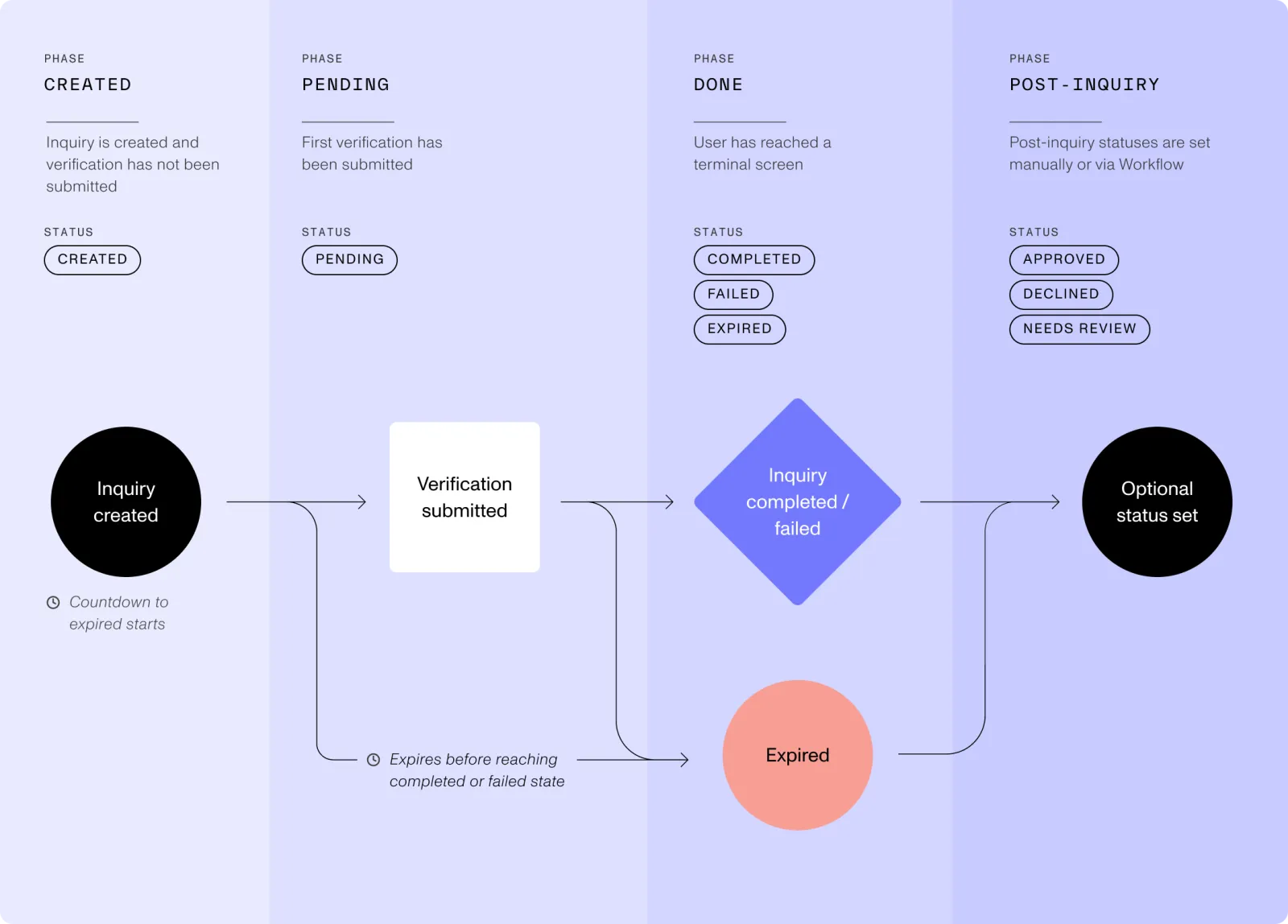
Typically, inquiries in the approved, declined, and needs_review statuses contain results for you to use. See Inquiry Model Lifecycle for the full status and event reference.
Dashboard, API, and webhooks
There are several ways to get data out of Persona.
To pull data from Persona:
- You can read inquiry details in the Persona Dashboard.
- You can fetch inquiry details from the Retrieve an Inquiry API endpoint.
To get data pushed to you, use webhooks. Persona will send an HTTP request to your webhook endpoint when inquiry events occur, such as inquiry.declined or inquiry.approved. See Webhooks for details.
Try out an inquiry
If you haven’t yet experienced a Persona inquiry as an end user, we recommend you to complete a test inquiry to help you understand the product. A quick way to do this is to add a Persona solution (e.g. the KYC Solution) to your Persona sandbox, then create a Hosted Flow link using one of the no-code methods.
Footnotes
-
If you want to provide your own identity verification UI, you need to use a Transactions-based integration. To learn more, contact the customer support engineering team. ↩