

Webhook OAuth Authentication
Enterprise support
This feature is restricted to customers on the Enterprise plan. Please reach out to your Account Team or contact us if you are interested in enabling and setting up this feature.
Description
By default, Persona authenticates outbound webhooks with a shared secret and a Persona-Signature header. When OAuth is enabled, Persona additionally fetches an OAuth 2.0 access token from your authorization server using the Client Credentials grant (RFC 6749 §4.4) and attaches it as Authorization: Bearer <access_token> on every webhook delivery to your endpoint.
This is useful when your endpoint sits behind an identity-aware proxy, an API gateway, or a service mesh — or when your security policy requires every inbound request to carry a short-lived bearer token.
Persona supports the Client Credentials grant only. Authorization Code, PKCE, Device Code, and JWT-based client authentication (private_key_jwt, client_secret_jwt) are not currently available.
Before you begin
You’ll need the following from the authorization server you want Persona to authenticate against:
- A token endpoint URL. Must be publicly reachable over HTTPS.
- A client ID and client secret issued for Persona. We recommend creating a dedicated machine-to-machine client so you can revoke access without affecting other integrations.
- The token endpoint authentication method the client is configured for — either
client_secret_basic(HTTP BasicAuthorizationheader on the token request, the default for Okta, Auth0, and Apigee) orclient_secret_post(credentials in the request body, NOT RECOMMENDED). - Any scopes your endpoint expects, space-separated.
Configure OAuth on a Webhook
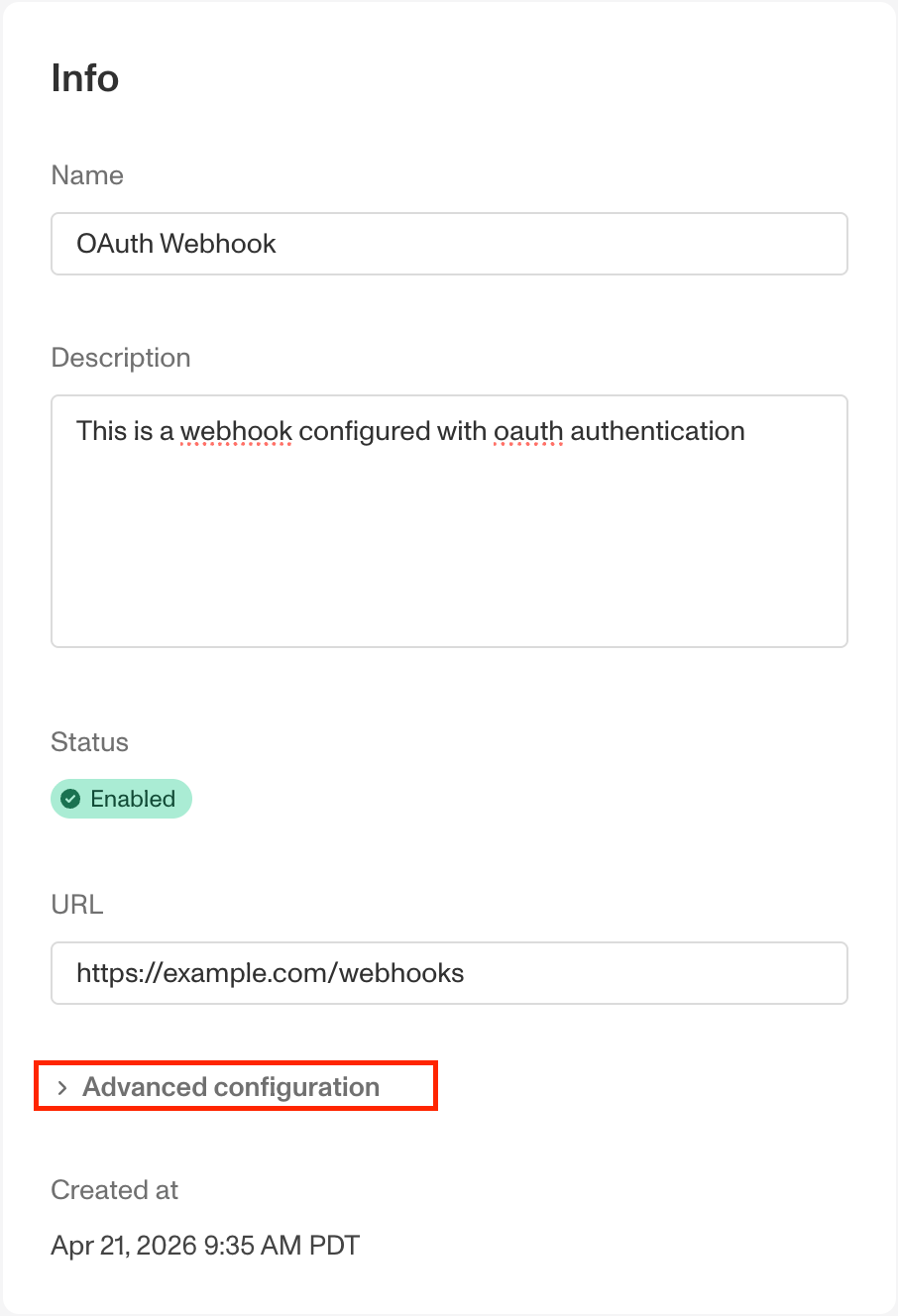
In the Dashboard, go to Integration → Webhooks and select an existing Webhook or click Add webhook. At the bottom of the form, expand the Advanced configuration section.
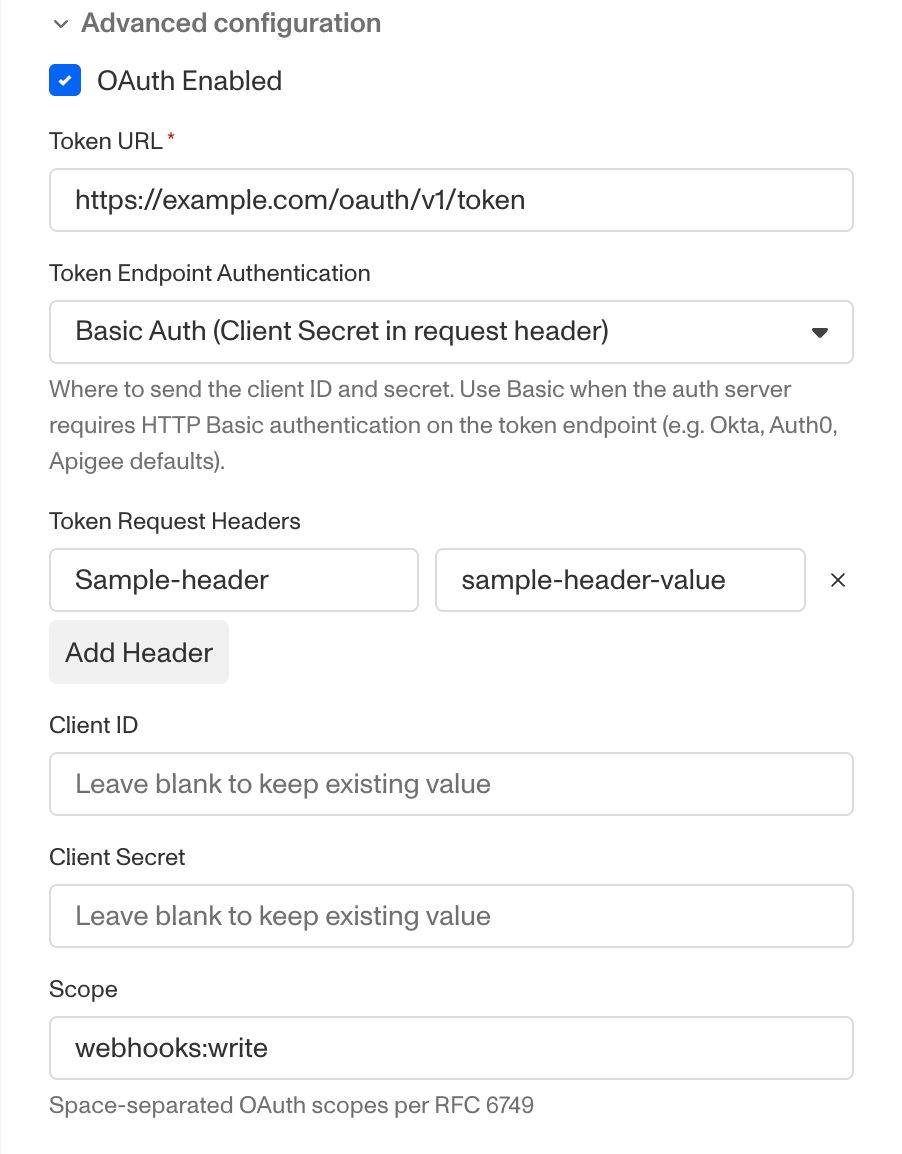
Check OAuth Enabled and fill in the following fields:
- Token URL (required) — HTTPS endpoint that issues access tokens. Must be publicly reachable.
- Token Endpoint Authentication (required) — how Persona presents the client credentials:
client_secret_basic(HTTP BasicAuthorizationheader) orclient_secret_post(in the form body). - Token Request Headers (optional) — additional static HTTP header key/values to include on the token request. The following headers are reserved:
Authorization,Content-Type,Connection,Keep-Alive,Proxy-Connection,Transfer-Encoding,Te,Upgrade,Trailer,Host,Content-Length,Proxy-Authorization,Expect,X-Forwarded-For,X-Forwarded-Proto,Forwarded,Via. - Client ID (required) — identifier for the OAuth client.
- Client Secret (required) — secret for the OAuth client.
- Scope (optional) — space-separated list of OAuth scopes per RFC 6749 §3.3 — for example,
webhooks:write read.
Persona validates the configuration on save but does not call your token endpoint until the next event is delivered.
When you save the form, your Client ID and Client Secret are encrypted at rest and never returned to the Dashboard. If you re-open the Webhook later, these fields display with a Leave blank to keep existing value placeholder. Leave them blank to keep the existing values, or enter new values to replace them.
How delivery works
Token request
To retrieve an OAuth token, Persona POSTs to your token endpoint with grant_type=client_credentials. The exact request shape depends on the Token Endpoint Authentication you selected.
Persona expects a JSON response in the standard RFC 6749 §5.1 shape:
Webhook delivery
Once a token is available, Persona POSTs the event to your webhook endpoint with the token attached:
The standard Persona-Signature HMAC header is still sent. We recommend you verify both — the OAuth token authenticates that Persona obtained valid credentials from your authorization server, and checking the signature confirms the payload was generated by Persona and has not been tampered with in transit.
Token request errors
If Persona cannot obtain an access token from your authorization server, the webhook delivery is recorded as failed and your endpoint is never called without a valid token. How the failure is handled depends on why the token request failed:
- Temporary errors retry normally — network failures, TLS errors, timeouts (< 10s), or
5xxresponses from the token endpoint are treated like any other delivery failure: the Webhook Event enters the standard retry schedule and will be retried until it succeeds or runs out of attempts. - Invalid credentials fail permanently — if the token endpoint returns
400or401(for example, a revoked client secret or misconfigured credentials), the delivery is marked as failed and is not retried. Fix the OAuth configuration, then use the manual retry from the Webhook Event detail page in the Dashboard to redeliver the event.
The Webhook Event detail page in the Dashboard shows the underlying error class and HTTP status returned by your authorization server, so you can debug without needing logs from the auth server itself.
For security, the Authorization header value is redacted to <redacted> in the request payload Persona stores on each Webhook Event. The bearer token is never visible in the Dashboard, audit exports, or support tooling.
Limitations
- A Webhook may have at most one OAuth configuration. If you need to deliver the same events to two endpoints with different auth servers, configure two Webhooks.
- Token request headers are limited to 15 entries, 4 KB per header, 16 KB total. The
Authorization,Content-Type, andAcceptheaders cannot be overridden.