

Server SDK Quickstart
The Server SDK handles the server-side steps of the Relay flow. It abstracts away Privacy Pass cryptography and handles retries automatically.
Looking for full API documentation? See the Server SDK Reference.
Installation
Node.js
Go
Setup
Node.js
Go
Relay methods live on the persona.relays namespace.
The environment is inferred from your API key: a sandbox key runs against sandbox, a production key against production. Requires @persona/sdk-node 0.4.0 or later.
Creating a Relay session
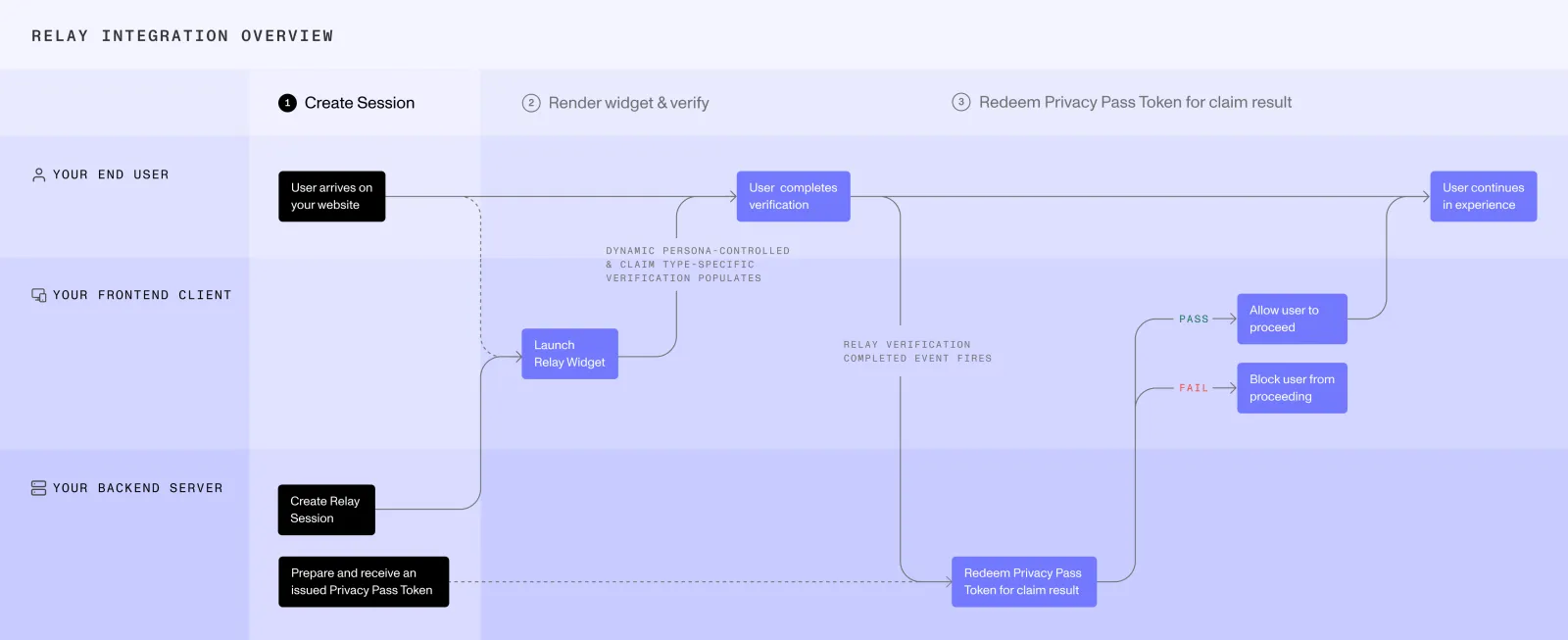
Create the Relay session before starting your selected client-side integration. Store the Relay token and Relay secret on your server — never expose the Relay secret to the client. Return the Relay session access token to your client.
We recommend generating an asymmetric key pair so that the claim payload is encrypted and only decryptable by your server.
Pass the Relay session access token to the Embedded Widget, Hosted Flow, iOS SDK, or Android SDK.
Issuing a Privacy Pass
A Privacy Pass is the billing unit for Relay. It is billed on creation and redeemed to fetch the claim result. Issuance uses your API key and identifies your platform to Persona for billing. Redemption uses the Privacy Pass token instead of your API key. Each Privacy Pass can only be redeemed once. Store privacyPassToken on your server and map it to the corresponding Relay session.
Issuing a Privacy Pass depends only on the claim type — it is not tied to a specific relay, so it can be called at any time, even before the relay is created. One Privacy Pass must exist before you can redeem any relay.
This step requires your Persona API key — you can find it in the Persona Dashboard under API Keys.
The signing key the SDK fetches is determined by the claim type you pass, so each Privacy Pass is bound to that claim type. A pass can only redeem a relay created with the same claim type — if they don’t match, the pass won’t be able to redeem the claim. Always issue against the same claim type you used when creating the relay.
Redeeming the claim
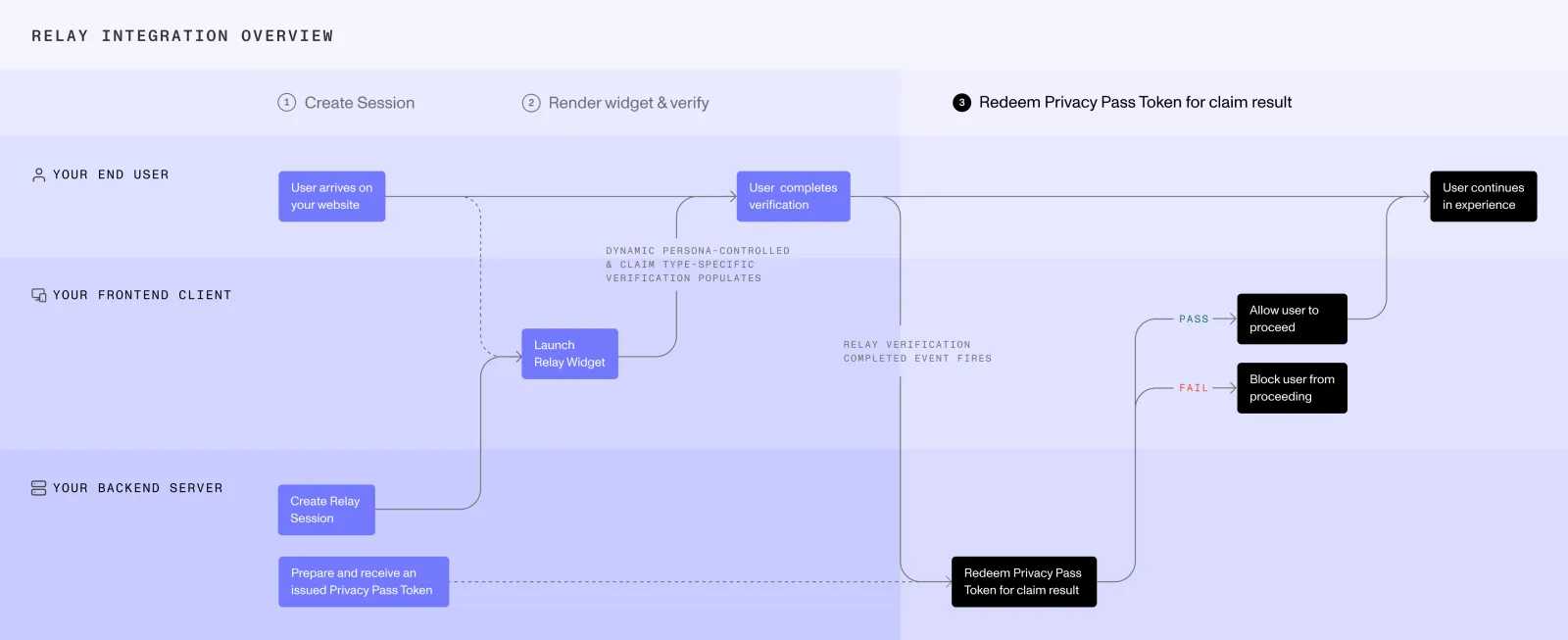
Begin claim retrieval when your client-side integration indicates that the user-facing flow is complete:
- Embedded Widget: Call your server from
onComplete. - Hosted Flow: Begin polling your backend when the user launches Hosted Flow.
- iOS SDK and Android SDK: Call your server after the platform’s normal Inquiry completion mechanism reports that the user-facing experience ended.
The SDK handles the full blind RSA protocol internally.
The Privacy Pass is redeemed only on a successful claim. Since each pass can only be redeemed once, retrying a successful request with the same already-spent token — for example, after a network drop where your server never received the response — would normally result in a double-spend error. Idempotency is handled automatically by the SDK.
Parsing the claim payload
If you opted out of encryption, parse the claim payload directly:
If you provided an encryption key, decrypt the payload with your private key first.
See the claim payload schema for the full type definition.