

Workflows
Workflows are a flexible, intuitive, and powerful way to streamline your identity processes. You can use them to automate repetitive manual decisions and decrease manual review time.
For example, you can create a workflow to automatically tag high-risk inquiries, run additional reports when specific conditions are met, or ingest non-Persona, 3rd party data.
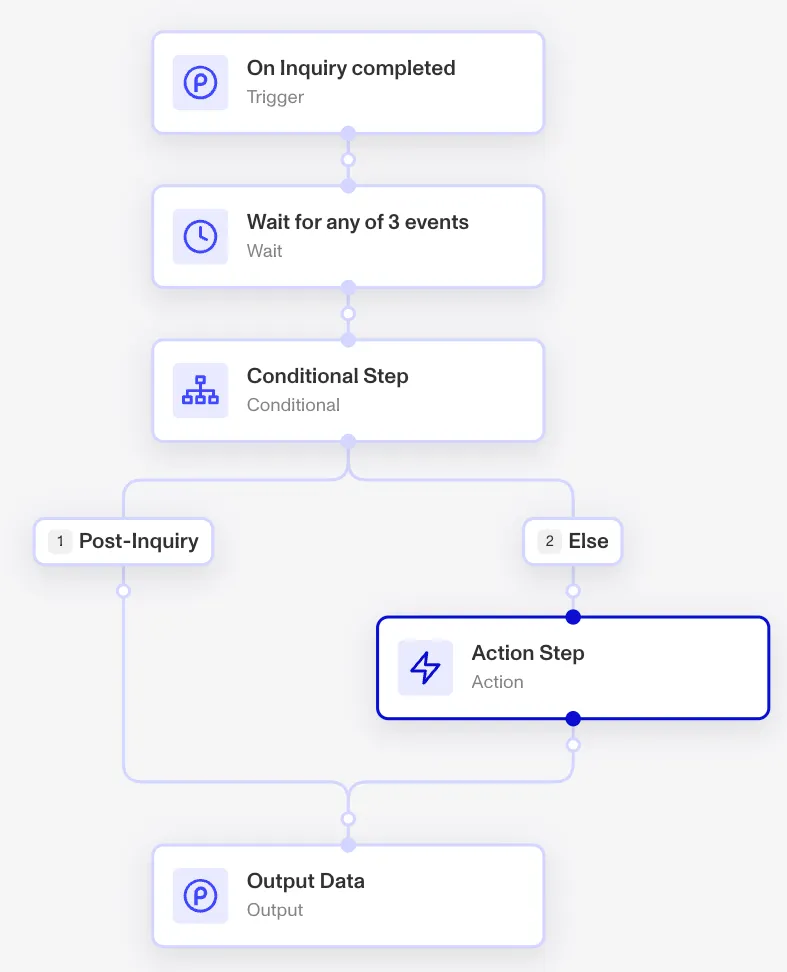
Creating a workflow
A workflow lets you sequence a set of conditional actions.
Triggers
All workflows begin with a trigger, which initiates the workflow. Several trigger types exist:
-
Event triggers: Configure your workflow to initiate when an event in Persona occurs. Find the list of possible events you can trigger a workflow from on the Events page.
-
API triggers: Initiate a workflow via an API request to Persona. Pass in any data in the body of the request, which the workflow can then access.
-
Scheduled triggers: Initiate a workflow at a future time configured by another workflow’s Schedule Workflow action.
-
Recurring triggers: Run a workflow against a set of matching objects (e.g. accounts, cases, inquiries, reports, or transactions) on a recurring schedule, optionally applied to the objects that match a filter.
-
Manual (direct) triggers: Start a workflow on an attached source object — for example, from within a dynamic-flow inquiry template. This is how you manually run a workflow on a specific object.
-
Account triggers: Run a workflow from an account action menu on the account, with inputs collected by a configurable form.
-
Case triggers: Run a workflow from a case action, with inputs collected by a configurable form.
-
Verification triggers: Run a workflow when a verification’s state changes.
A workflow can also trigger another workflow via the Run Workflow action.
Steps
Workflows consist of a series of steps. Six step types exist:
- Action step: An action step takes action on an object. See the section below for details.
- Wait step: A wait step pauses the workflow until a specified event or action occurs, or for a set amount of time.
- Parallel step: A parallel step creates multiple branches in the workflow that run simultaneously.
- Conditional step: A conditional step lets you express if/then/else logic that creates several possible branches in the workflow. The logic can refer to objects in earlier parts of the workflow, including the event that triggered the workflow. It can reference properties of an inquiry, account, preceding report actions, case statuses, and more.
- Loop step: A loop step iterates over a list of items (for each), repeats until a condition is met (while), or maps over a list (map), running a set of nested steps on each iteration.
- Module step: A module step calls a reusable workflow module, letting you package a set of steps and reuse them across workflows.
Features
Action steps
Workflows support a large library of actions. Possible action steps include:
Add Item to List: Populate Persona Lists.Approve Inquiry: Approve Persona Inquiries.Create Case: Create a Persona Case for manual review.Create Inquiry: Create a Persona Inquiry.Decline Inquiry: Decline Persona Inquiries.Evaluate Code: Craft custom JS logic.Inquiry Link Email: Send emails containing Inquiry links.Inquiry Link SMS: Send SMS containing Inquiry links.Make HTTPS Request: POST and GET to HTTPS endpoints. Configure template-level Webhooks as well.Mark Inquiry for Review: Mark Persona Inquiries for Review.Redact Object: Redact Inquiries and Accounts automatically. Field-level and conditional redaction possible when done via workflows.Run Report: Access and run the full library of Reports. Examples include Person Watchlist and Adverse Media Report, among others.Run Workflow: Initiate another Persona workflows. Useful to chain together multiple workflows.Send Email: Fully customize email messages sent via Persona. Includes HTML styling, as well as advanced configuration options to specify the From email address, SMTP server address, SMTP server port, SMTP server TLS, SMTP server user, and SMTP server password.Send Slack Message: Send Slack messages.Send SMS: Fully customize SMS messages sent via Persona.Tag Object: Tag Persona objects (e.g. Inquiries, Cases, Reports, etc).Trust Device: Mark devices as trusted.Update Hubspot: Update Hubspot objects.Update Salesforce: Update Salesforce objects.Update Zendesk: Update Zendesk tickets.
Handle asynchronous activity
Workflows support asynchronous activity by allowing users to use Wait steps. There are two types of Wait steps:
-
Wait on objects
- Wait on one or many events. For example, you can set up a workflow to wait for an inquiry to get approved, a case to get created, etc.
- Specify a default resolution time, which is a timeout after which the workflow will proceed if the event the workflow listens for never occurs.
-
Wait for time
- Wait for a specified period of time to pass.
Conditional and parallel logic
Workflows can condition off numerous criteria, including:
- 3rd party criteria (e.g. values returned by custom code functions, ingested via API triggers, etc)
- Inquiry criteria (e.g. age, country, government ID number, selfie liveness score, etc)
- Report criteria (e.g. watchlist match, adverse media match, results from synthetic fraud report runs, etc)
- Case criteria (e.g. status of case resolutions, etc)
- Account criteria (e.g. tags associated with count, etc)
- Template criteria (e.g. certain inquiry templates, etc)
- Database criteria (e.g. matches found against databases Persona supports, etc)
In API-triggered workflows, you can configure the input schema, and conditionals in subsequent steps of the workflow can then access those defined fields.
Workflows also support parallel logic. For example, with a parallel step, you can run two reports at the same time.
Learn more
See our Help Center for details about how you can use and customize workflows. A few starting points: