

Android SDK
Use the Persona Android SDK to run the user-facing Relay verification in a native Android app.
Prerequisites
This integration requires Persona Android SDK 2.47.0 or later. Follow the Android integration guide to install the SDK and configure platform permissions.
How the Android flow works
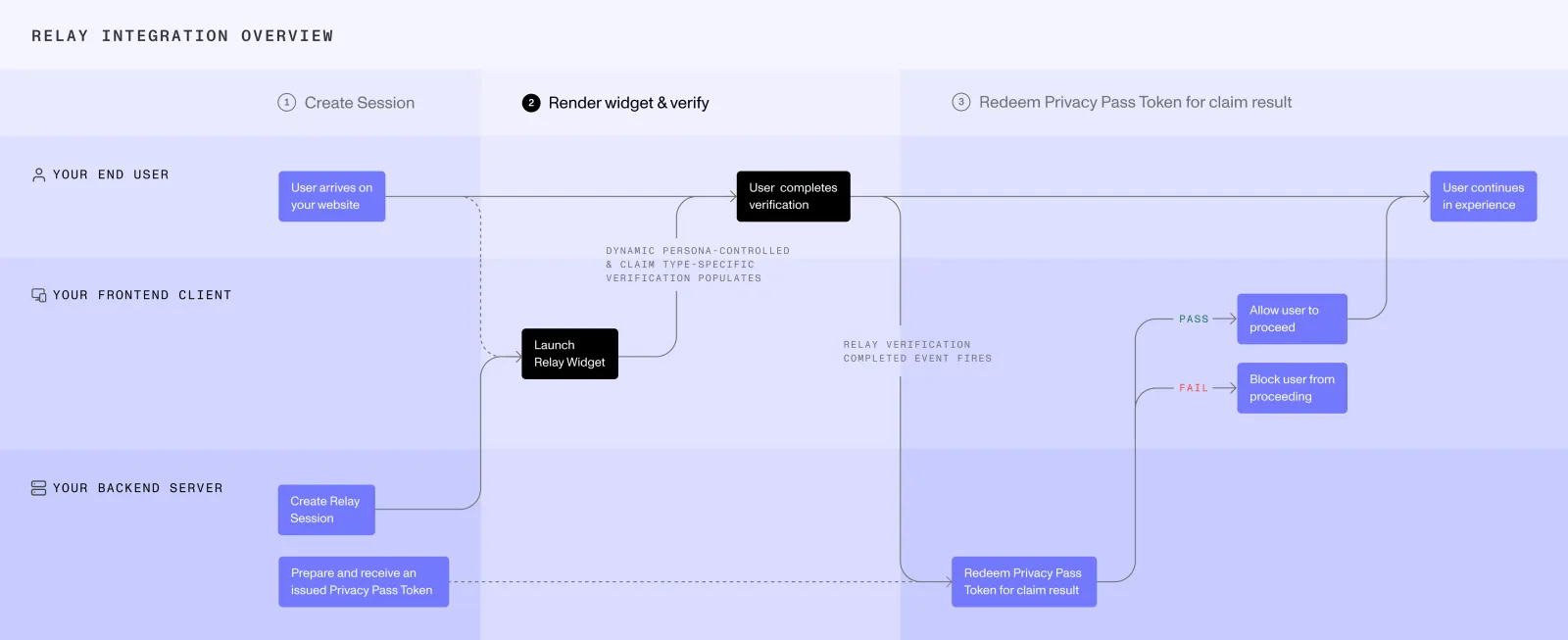
- Your server creates a Relay session.
- Your server stores the Relay token and Relay secret for claim retrieval.
- Your server returns the Relay session access token to the Android app.
- The app initializes the Persona Android SDK in Relay mode with that token.
- The SDK presents the Relay-specific Inquiry experience, including the applicable Relay consent UI.
- When the user-facing experience ends, the app asks your server to retrieve the claim result.
Store the Relay secret securely on your server. Never expose it to the client.
Start Relay
Follow the Android integration guide to install the SDK, register the Activity Result contract, and handle Inquiry results.
To start Relay, create the Inquiry with Inquiry.fromRelaySessionToken(...) instead of a template or Inquiry ID:
The Activity Result reports how the Inquiry experience ended. It does not return the Relay claim payload or PII to the app.
Set the language
By default, Relay follows the device language. To show Relay in a specific language, pass a language code such as fr to .locale(...) on the builder that Inquiry.fromRelaySessionToken(...) returns. See Languages for accepted language codes.
Relay mode behavior
Relay token initialization is a dedicated entry point. Do not combine it with template IDs, template versions, Inquiry IDs, one-time links, share tokens, or field mappings.
In Relay mode, the SDK omits information that identifies the host app, such as the Android package name. Relay mode also skips Play Integrity app attestation.
Use the Activity Result to coordinate your app’s UI. Retrieve the claim result through your server-side Relay integration.