

Inquiry Model Lifecycle
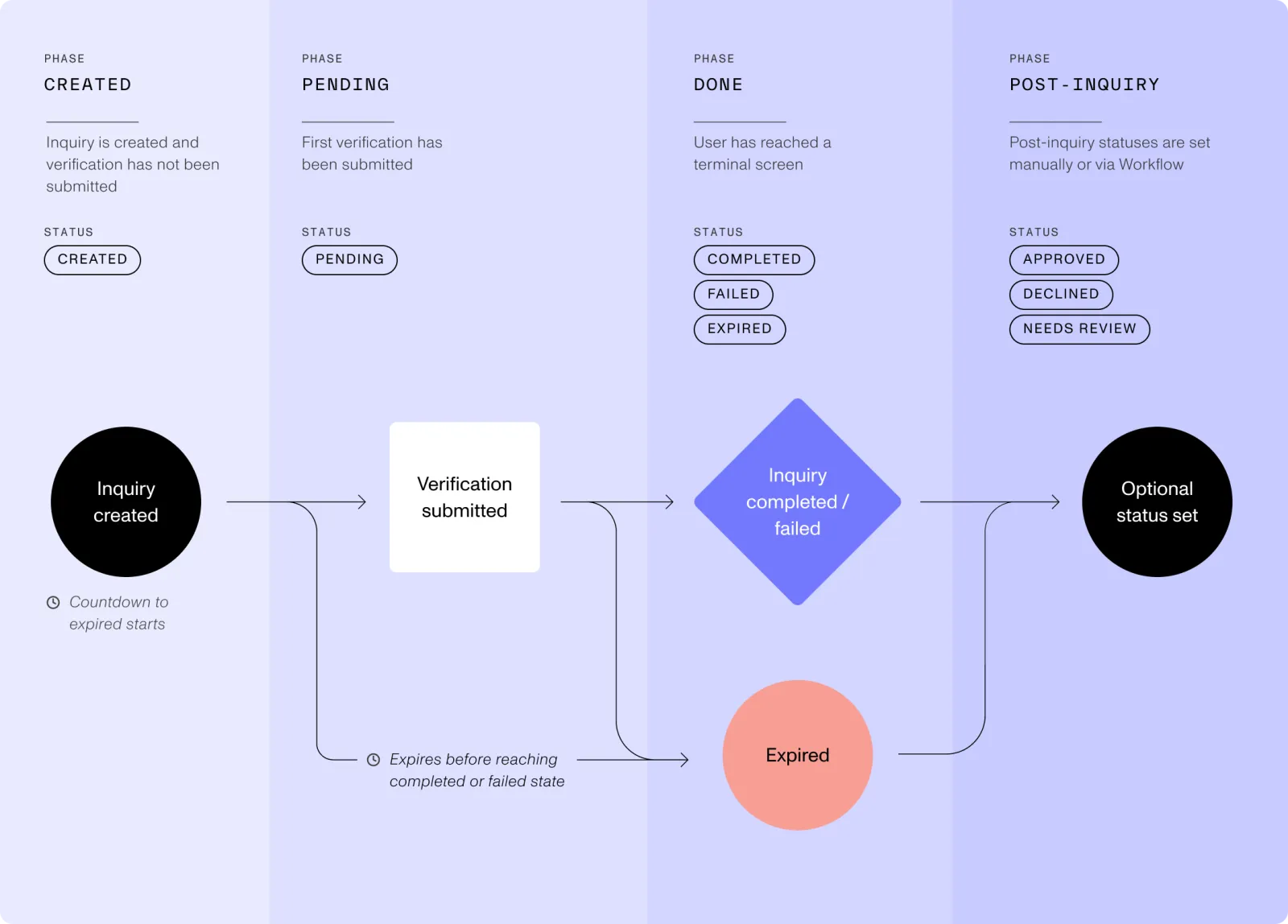
An inquiry wraps a single interaction with one of your end users. This guide explains the various stages and statuses that an inquiry can move through from its creation to conclusion. Together, these stages make up what we call the Inquiry Model Lifecycle. There are four phases in the lifecycle, some of which include multiple statuses.
Statuses
The status of an inquiry defines where an end user is in the inquiry process. Each status change can trigger a configured webhook.
See the diagram below to understand the possible statuses:
Status changes
In general, the status of an inquiry can change when:
- Your end user proceeds through their inquiry: for example, as they start a verification or complete the flow.
- Post-inquiry workflows run and apply business logic to automatically mark an inquiry as “approved”, “declined”, or “needs review”.
- Your organization’s members manually change the status of an inquiry.
- The inquiry expires.
Events
Every inquiry status change creates an event. You can use these events to trigger other actions, like running a Persona workflow.
The table below summarizes all statuses and their associated events:
Learn more about inquiry statuses in our Help Center.
Phases
What’s the difference between Done & Post-Inquiry?
The “Done” phase describes the inquiry as being “done” from the perspective of the end user. All inquiries will end up at some point in the Done phase (with a status of either Completed, Failed, or Expired).
The “Post-Inquiry” phase is an optional phase that happens after the user is “done”. The provided statuses here—Approved, Needs Review, & Declined—let you mark decisions you might make about the inquiry after the user is done.
When selecting which events, and thus statuses, to configure in your webhooks we strongly recommend configuring both approved & declined as they are the most actionable for your own systems.